
View and edit TotalSegmentator results in your browser
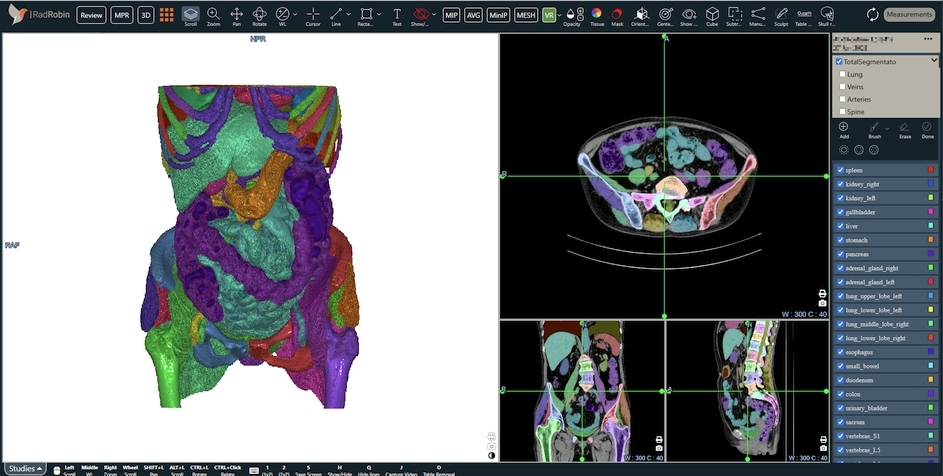
Run TotalSegmentator on your own GPU and get 117 named structures as an editable segmentation in a free web DICOM viewer. Nothing to install in the browser, and your images never leave your machine.
How it works
- Start the small RadRobin server next to your TotalSegmentator installation (instructions on GitHub).
- Open the RadRobin viewer and load a CT from a folder or a DICOMweb server.
- In review mode, select the series and press
F. The viewer sends it tolocalhost:8080. - The structures come back with their names. Review them, correct them, and save as DICOM SEG.
What you can do with the results
- Review 117 named structuresOrgans, bones, muscles and vessels, each with its anatomical name, in 2D, MPR and 3D.
- Edit and save as DICOM SEGCorrect the AI output and save it in the standard format other tools can read.
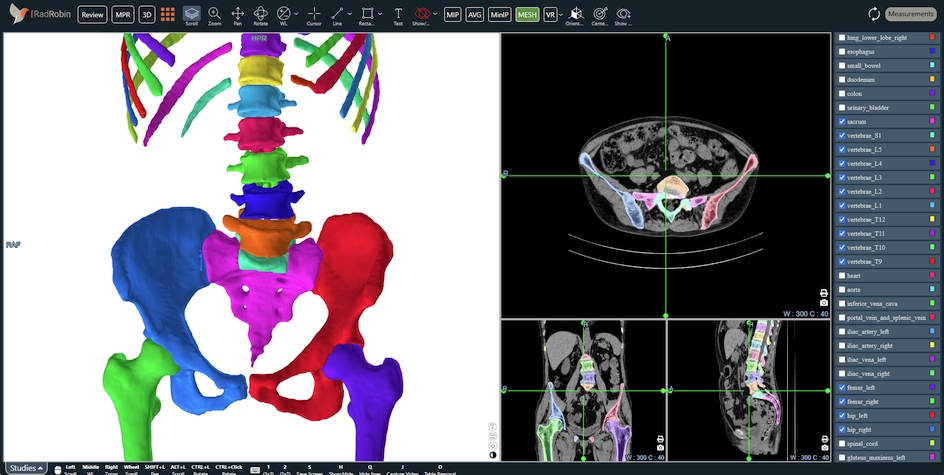
- Automatic spine labelingVertebra segmentations label the spine on 2D and MPR views.
- Aortic centerline and curved MPRGreat-vessel segmentations drive automatic centerlines and curved MPR of the aorta.
- 3D meshesTurn segmented structures into meshes for surgical planning or 3D printing.
- Fast or standard modeFast mode (3 mm) for a quick look, standard mode (1.5 mm) for detail.
Try it without installing anything
Two abdominal CT scans from the public C4KC-KiTS collection, with ready-made TotalSegmentator segmentations, are on GitHub. Download a case, open the viewer, click Select Folder and choose the case folder.
Run TotalSegmentator on your own GPU
You need TotalSegmentator 2.x in a Python environment, ideally with an NVIDIA GPU. Add three packages and start the server:
pip install -r requirements.txt python server.py
The server listens only on your own computer. If your GPU is on another machine, connect with an SSH tunnel. Full instructions, the API and a test tool are in the GitHub repository.
Questions
Is it free?
Yes. The viewer is free to use in the browser, and the TotalSegmentator server is open source under the MIT license.
Are my images uploaded?
No. The viewer runs in your browser and sends the series only to the TotalSegmentator server you run yourself, normally on your own computer. Nothing is sent to RadRobin.
Do I need a GPU?
An NVIDIA GPU is recommended. TotalSegmentator also runs on a CPU, but much more slowly; use fast mode.
Can I use a GPU on another machine?
Yes. Run the server on the GPU machine and connect with ssh -L 8080:localhost:8080 you@gpu-server. The viewer keeps talking to localhost:8080.
Which TotalSegmentator version is supported?
Version 2.x with the open total task (117 structures). Version 1 used different label numbers.
Can I use it for diagnosis?
No. RadRobin and TotalSegmentator are research tools and are not cleared for clinical use.